一,基本安装
- github中新建blog项目,项目名为:yourname.github.io(使用此后缀的github项目会自动开启github pages)
- 如果没有开启github pages,进入项目的setting中找到对应开启的地方进行开启。
- 本地下载hexo(前提:安装node)
- 全局安装hexo-cli:npm install -g hexo-cli
- 创建hexo项目:hexo init yourdir
- 本地调试:进入yourdir, 安装node依赖包,启用:hexo s –debug
- 打包: hexo g
- 配置github地址:
- 下载安装:hexo-deploy-git: npm i hexo-deploy-git –save
- 修改配置文件:_config.yml
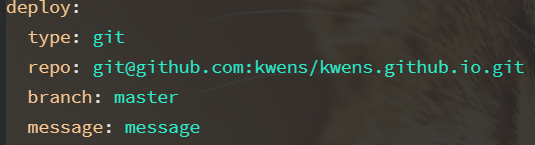
- 提交打包后的文件:hexo d
- 访问yourname.github.io即可看到。
二,使用主题:https://hexo.io/zh-cn/docs/themes
可以在themes目录下新建你的主题:一个主题可能包括如下结构
1
2
3
4
5
├── _config.yml
├── languages
├── layout
├── scripts
└── source我的博客使用的是第三方主题next: http://theme-next.iissnan.com/
- 在博客源码目录下安装:git clone https://github.com/iissnan/hexo-theme-next themes/next
- 启用主题:修改_config.yml下的themes字段为next.
- theme: next
- 修改其他主题设定,请看文档。
绑定域名
注册域名,这里使用的是阿里域名,具体如何申请不再述说。
添加域名解析,例如:
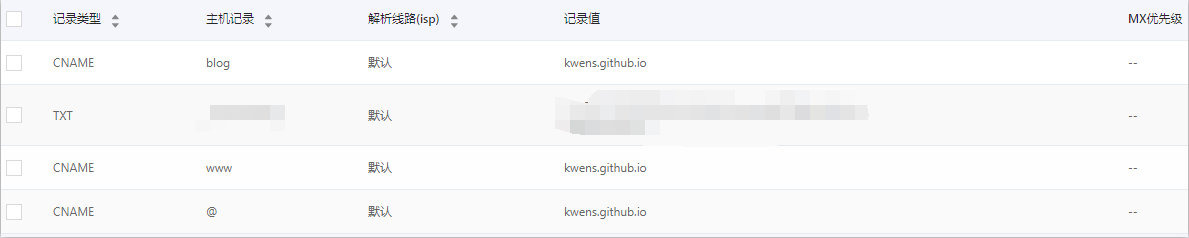
在博客源码source目录下新建CNAME文件,并写入你的域名
- 重新打包并推送到你的github博客项目。
- 使用域名访问你的博客